
Skip to content
Next Level Property Management
> nlpm://searchLoading index…
  • Quick actions

    Talk to us/contact
  • Reno market data/market-data
  • Find an apartment/rentals
  • Resident portal/go/resident-portal
  • Client portal/go/client-portal
  • Call (775) 502-8287

Free template

T-12 normalizer

Turn a seller's trailing-12 statement into numbers you can underwrite: mapped to a standard chart of accounts, checked line by line for anything odd, and bridged from seller NOI to a realistic NOI.

  • Excel, Sheets, Numbers
  • Sample property included
  • 9 tabs

Get the template

Inside the workbook

What you get, tab by tab

Tab 1

Summary

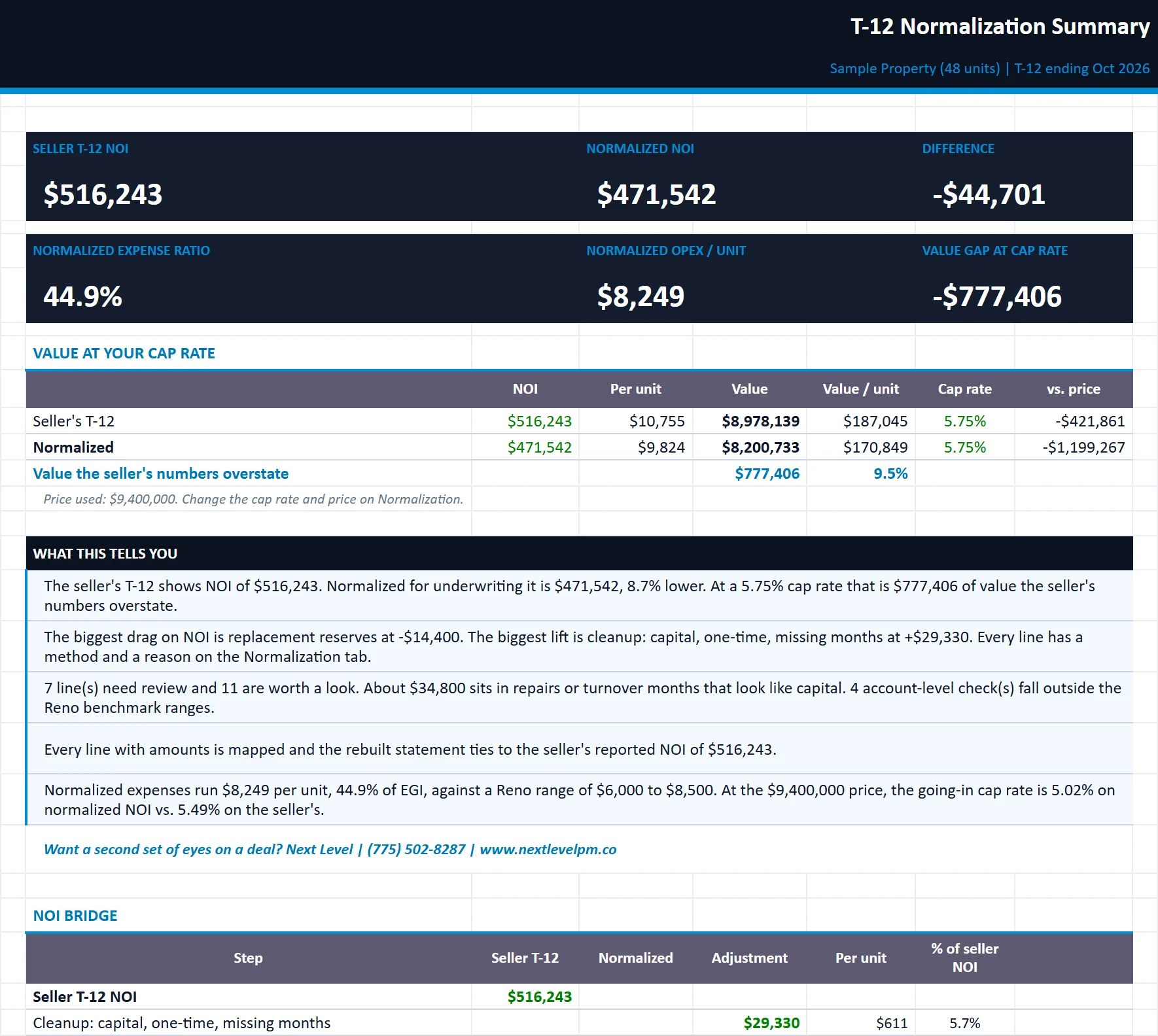
Seller NOI vs. normalized NOI, the value gap at your cap rate, a waterfall of every adjustment, lines to review and plain-English insights.

t12-normalizer.xlsx
The Summary tab of the t12-normalizer workbook, filled in with the sample property
SummaryAnomaliesNormalizationOwner SummaryPaste T-12Mapped T-12BenchmarksChart of Accounts

Tab 2

Anomalies

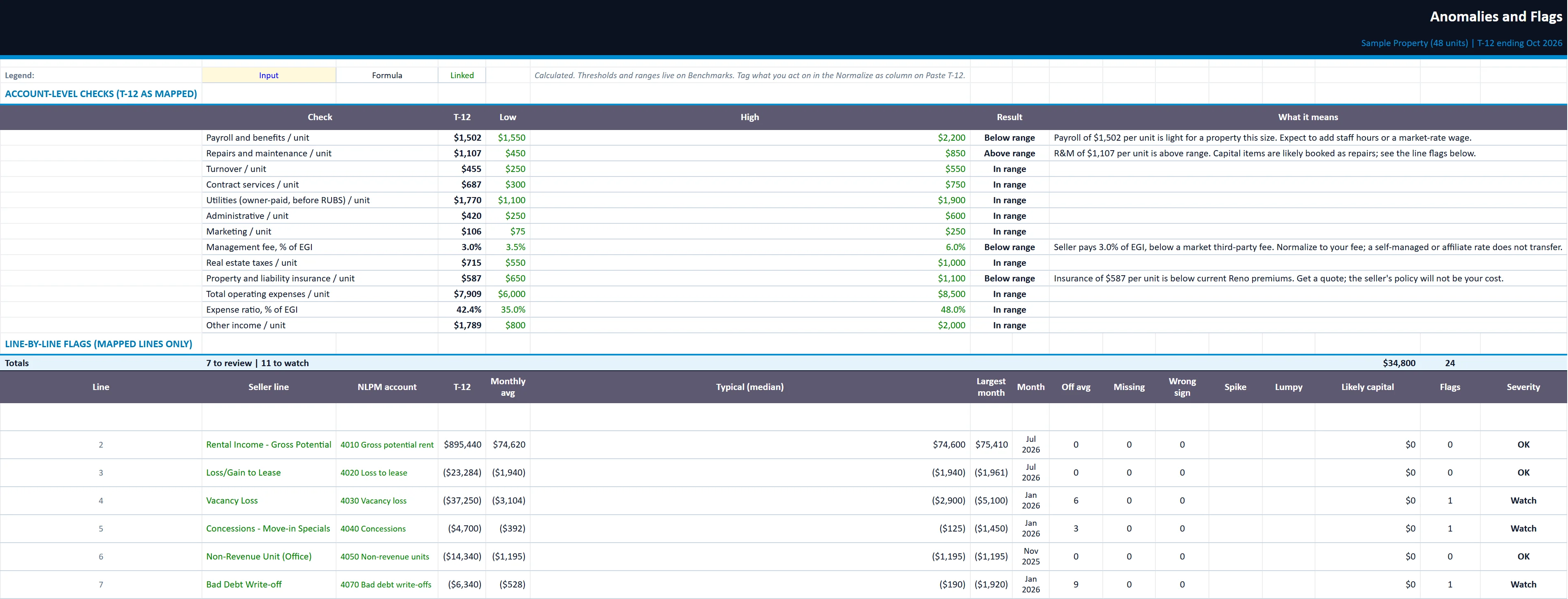
Account-level benchmark checks plus line-by-line flags with an explanation of each.

t12-normalizer.xlsx
The Anomalies tab of the t12-normalizer workbook, filled in with the sample property
SummaryAnomaliesNormalizationOwner SummaryPaste T-12Mapped T-12BenchmarksChart of Accounts

Tab 3

Normalization

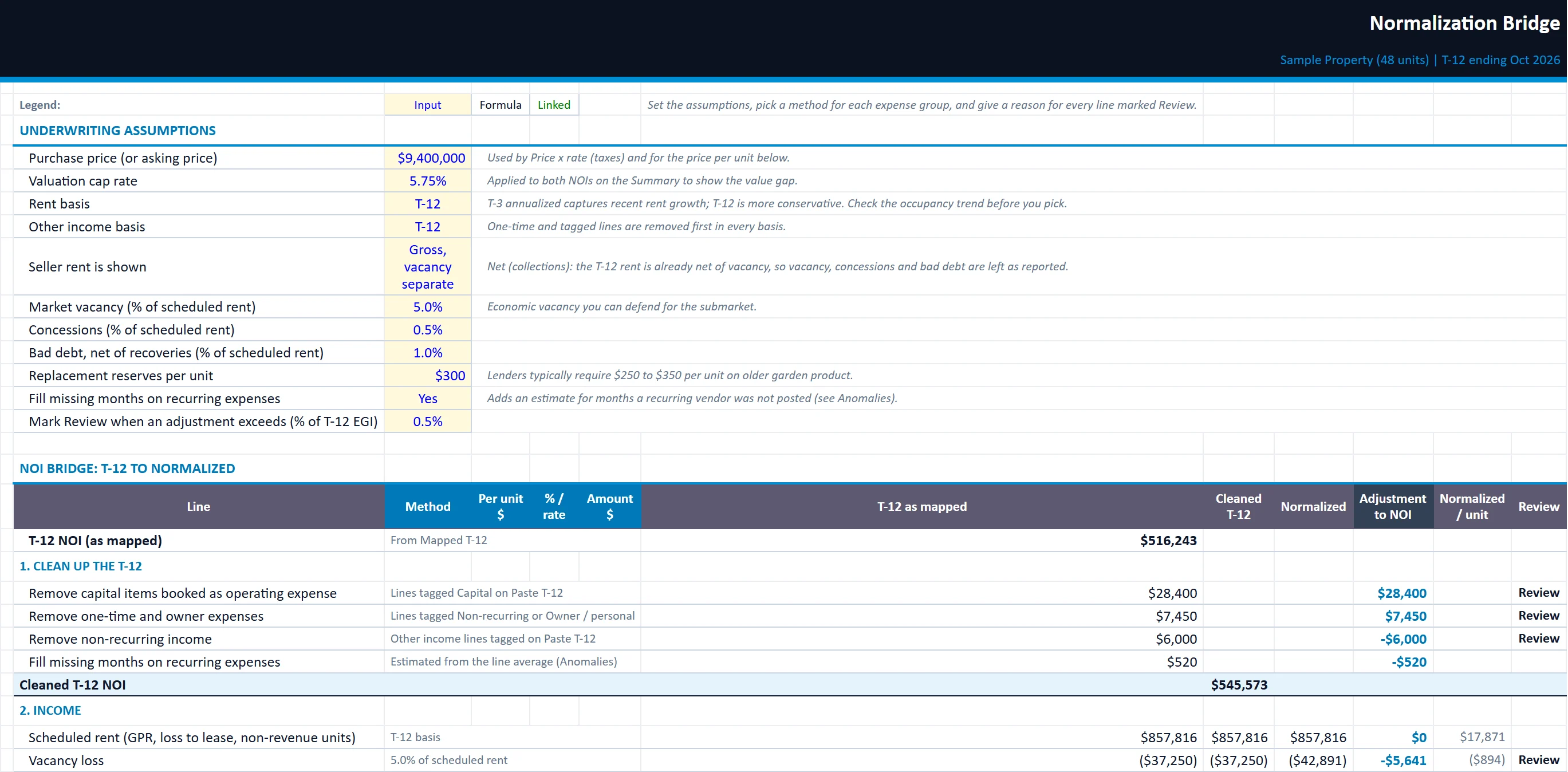
Your underwriting assumptions and the bridge from T-12 NOI to normalized NOI, with a reason for each adjustment.

t12-normalizer.xlsx
The Normalization tab of the t12-normalizer workbook, filled in with the sample property
SummaryAnomaliesNormalizationOwner SummaryPaste T-12Mapped T-12BenchmarksChart of Accounts

Owner Summary

A clean one-page underwriting summary with your logo and company name, ready for an investor or lender.

Paste T-12

Paste the seller's statement here. Auto-suggested mapping, overrides, sign settings and tags for capital and one-time items.

Mapped T-12

The seller T-12 rebuilt in the NLPM chart of accounts by month, with subtotals, NOI, per-unit figures and a tie-out check.

Benchmarks

Editable per-unit ranges for a stabilized Reno-area garden property and the anomaly thresholds.

Chart of Accounts

The NLPM income, expense and below-the-line accounts used for mapping.

Built for

Who it is for

  • Buyers in due diligence
  • Investors comparing a listing to its real numbers
  • Lenders and partners reviewing a deal

How to use it

Up and running in six steps

  1. 1Enter the property name, the last month of the T-12 and the unit count on the Start Here tab.
  2. 2On Paste T-12, set how the seller shows income, expenses and contra lines (vacancy, concessions, bad debt). Then paste their statement into A14:O313: account # (optional), account name, 12 months oldest to newest, and their total. The sample rows are inputs: select A14:R313 and press Delete to clear them.
  3. 3Review the Status column. Pick an NLPM account in Map to for any red Unmapped line, or to correct a suggestion. Subtotal rows (Total, Net operating income) are excluded automatically.
  4. 4Check Mapped T-12. The tie-out block must read Ties before you rely on anything downstream. Enter the seller's reported NOI on Paste T-12 to prove it.
  5. 5Work the Anomalies tab. Tag capital items, one-time and owner expenses in the Normalize as column on Paste T-12.
  6. 6On Normalization, set your underwriting assumptions and a method for each expense group. Add a reason for every line marked Review, then read the Summary and print the Owner Summary.

Rather have us run the numbers?

Send us your rent roll and T12 and we will build this for your property and show you what it says.

Questions

T-12 Normalizer questions

What is a T-12?
A trailing-12 is the property's income and expenses for the last twelve months, month by month. It is the starting point for underwriting an acquisition.
What does normalizing a T-12 mean?
Adjusting the seller's numbers to what a new owner will actually run: resetting taxes and insurance, taking capital out of repairs, removing one-time and owner expenses, and setting realistic management and payroll.
Does it work with any seller's format?
Yes. Paste the statement as it comes. The workbook suggests a standard account for each line from a keyword table, and you can override any of them.

Insights

The guide behind it

All articles