Skip to content
Next Level Property Management
> nlpm://searchLoading index…
  • Quick actions

    Talk to us/contact
  • Reno market data/market-data
  • Find an apartment/rentals
  • Resident portal/go/resident-portal
  • Client portal/go/client-portal
  • Call (775) 502-8287

Free template

Rent comp analysis template

Line your property up against up to seven nearby competitors, unit type by unit type, with concessions and required fees turned into true all-in rent and an indicated market rent.

  • Excel, Sheets, Numbers
  • Sample property included
  • 8 tabs

Get the template

Inside the workbook

What you get, tab by tab

Tab 1

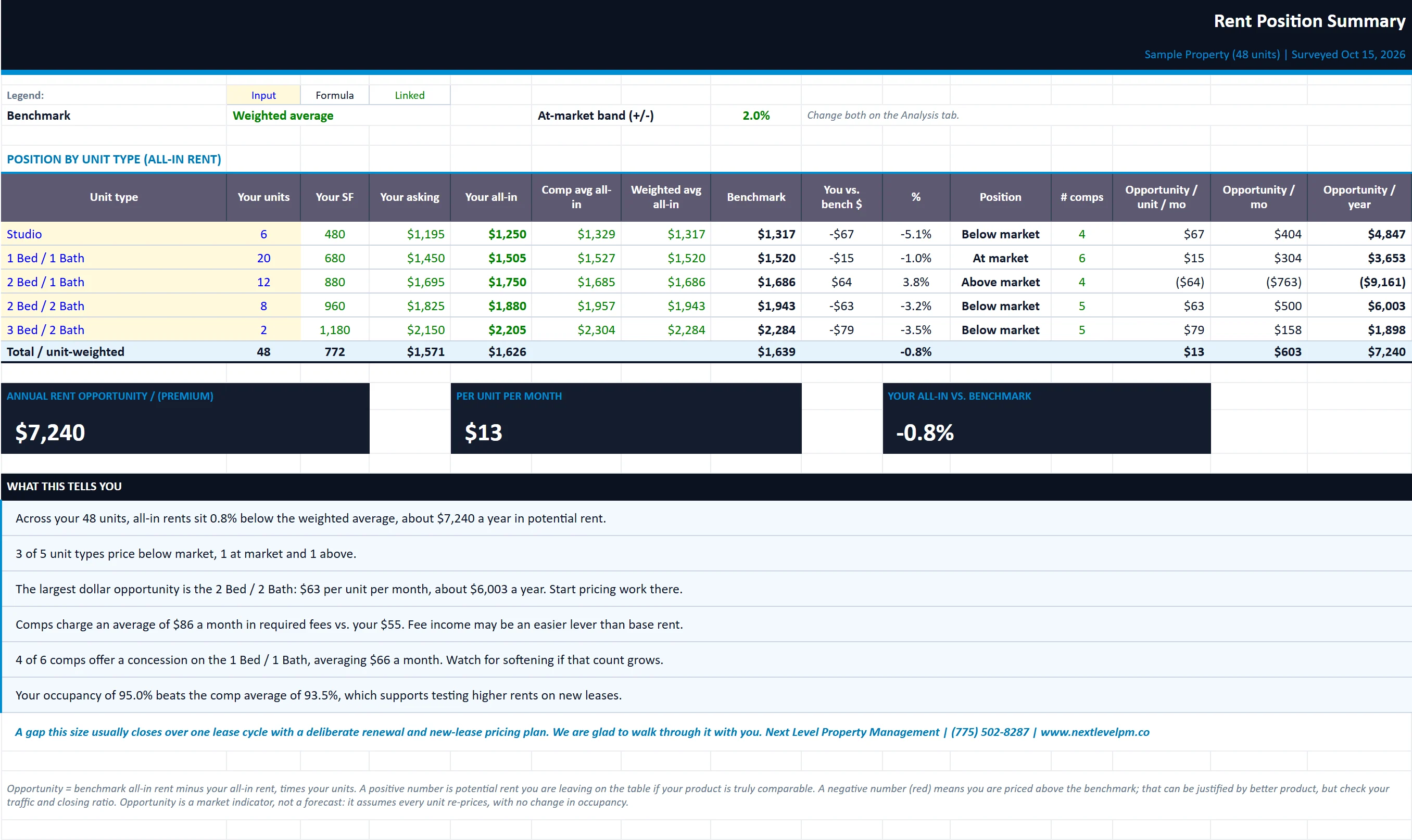
Summary

Every unit type in one table with your position against the comps and the total annual rent opportunity.

rent-comp-analysis-worksheet.xlsx
The Summary tab of the rent-comp-analysis-worksheet workbook, filled in with the sample property
SummaryRent SurveyAdjustment GridComp ProfilesAnalysisPhoto BoardOwner Summary

Tab 2

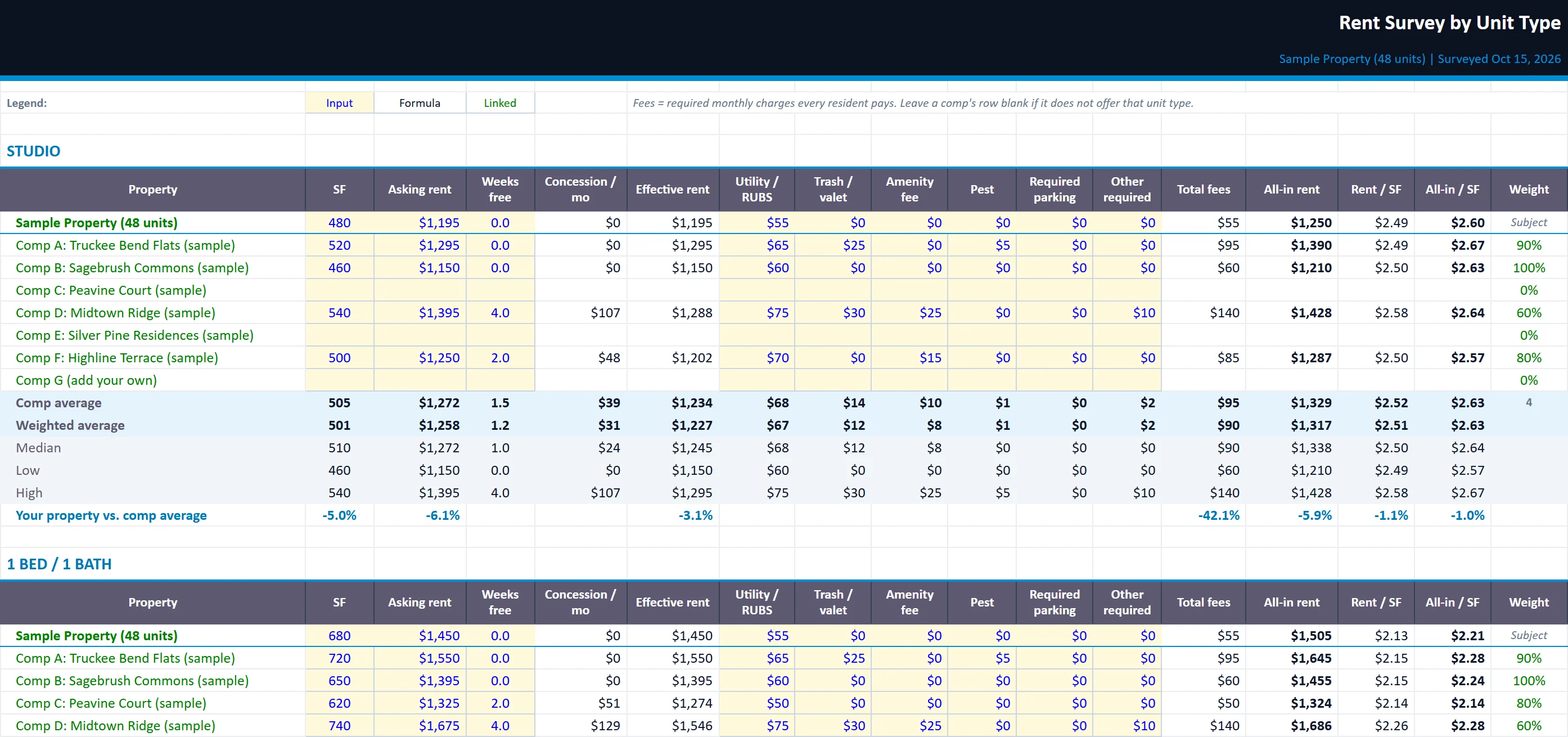
Rent Survey

Rent, size, concessions and required fees by unit type, with effective rent, all-in rent, rent per square foot and comp statistics.

rent-comp-analysis-worksheet.xlsx
The Rent Survey tab of the rent-comp-analysis-worksheet workbook, filled in with the sample property
SummaryRent SurveyAdjustment GridComp ProfilesAnalysisPhoto BoardOwner Summary

Tab 3

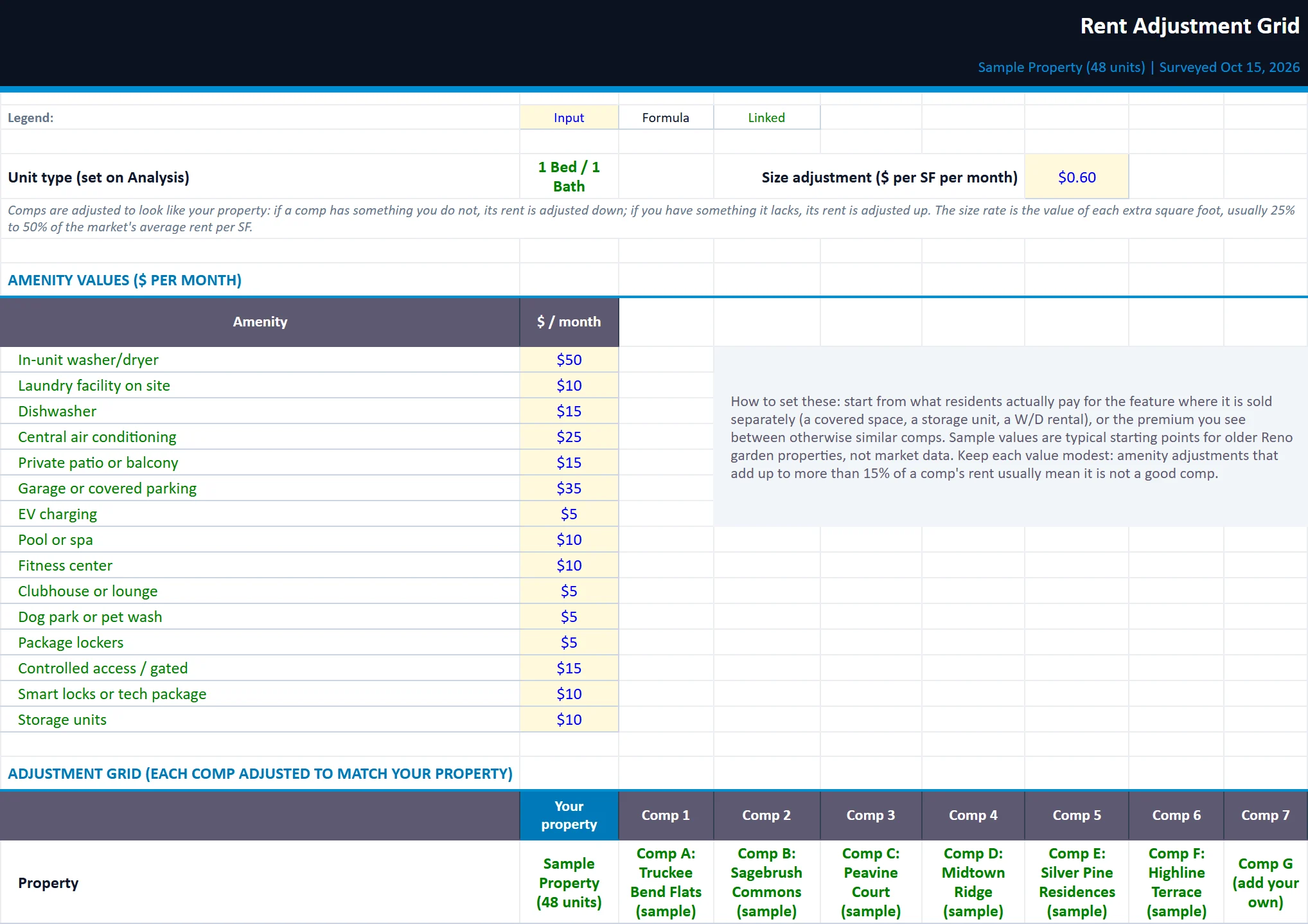
Adjustment Grid

An appraiser-style grid that adjusts each comp's all-in rent for size, amenities and condition to an adjusted market rent.

rent-comp-analysis-worksheet.xlsx
The Adjustment Grid tab of the rent-comp-analysis-worksheet workbook, filled in with the sample property
SummaryRent SurveyAdjustment GridComp ProfilesAnalysisPhoto BoardOwner Summary

Comp Profiles

Property details, comparability weights and the amenity matrix for your property and each comp.

Analysis

Pick a unit type for a side-by-side comparison, your position against the benchmark and an indicated market rent.

Photo Board

A visual card for each property with photo, key facts and all-in rent. Drop in your own photos.

Owner Summary

One clean page under your company name and logo for owners, partners or lenders.

Built for

Who it is for

  • Owners checking whether rents are at market
  • Investors validating a seller's rent roll
  • Leasing teams setting asking rents
Want a quick number first? Try the Rent increase calculator.

How to use it

Up and running in five steps

  1. 1Enter your property, the survey date and your name on Start Here.
  2. 2Add each comp's details, a comparability weight and its amenities on Comp Profiles.
  3. 3Enter square feet, asking rent, weeks free and every required monthly fee per unit type on Rent Survey.
  4. 4Set amenity values and size, condition or location adjustments on Adjustment Grid.
  5. 5Read your position on Analysis and Summary, then print the Owner Summary.

Rather have us run the numbers?

Send us your rent roll and T12 and we will build this for your property and show you what it says.

Questions

Rent Comp Analysis Worksheet questions

How many comps should a rent survey include?
Three to seven truly comparable properties is typical: similar age, size, unit mix and location. The template holds up to seven and lets you weight the closest matches more heavily.
Why compare all-in rent instead of asking rent?
Two properties with the same asking rent can cost a resident very different amounts once required fees and concessions are added. In Nevada, AB 121 also requires advertised rent to include mandatory fees, so all-in rent is the fair comparison.
How are concessions handled?
Weeks free are converted into a monthly value over the lease term and subtracted to give effective rent, so a property advertising a special compares fairly with one that is not.

Insights

The guide behind it

All articles