
Skip to content
Next Level Property Management
> nlpm://searchLoading index…
  • Quick actions

    Talk to us/contact
  • Reno market data/market-data
  • Find an apartment/rentals
  • Resident portal/go/resident-portal
  • Client portal/go/client-portal
  • Call (775) 502-8287

Free template

Unit turn and make-ready tracker

Track every vacant unit from move-out to move-in: each stage, the vendors, cost against budget, days vacant and the rent lost while it sits, with a 35-day schedule to run each morning.

  • Excel, Sheets, Numbers
  • Sample property included
  • 8 tabs

Get the template

Inside the workbook

What you get, tab by tab

Tab 1

Dashboard

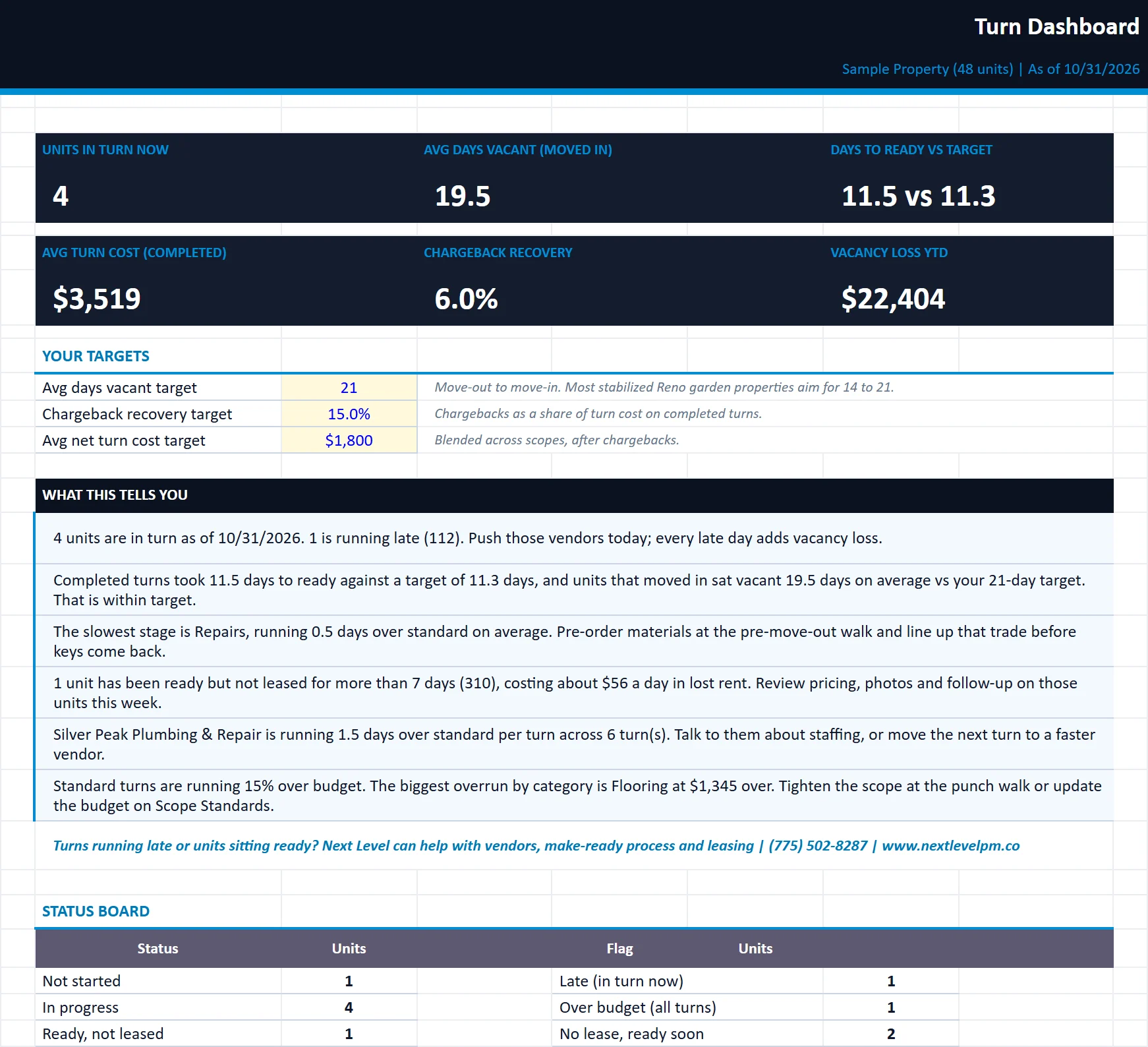
KPIs, status board, flags, charts and plain-English insights on speed, cost and vacancy loss.
unit-turn-make-ready-tracker.xlsx
The Dashboard tab of the unit-turn-make-ready-tracker workbook, filled in with the sample property
DashboardTurn BoardScheduleOwner SummaryVendorsCost AnalysisScope Standards

Tab 2

Turn Board

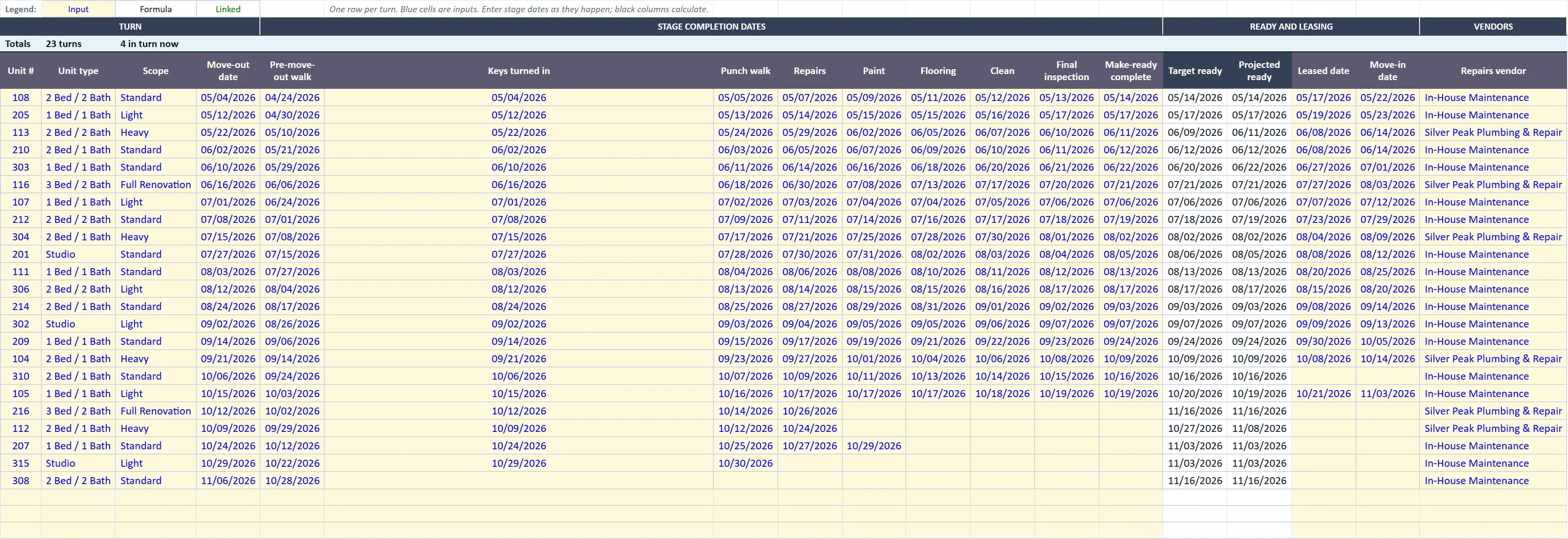
One row per turn: dates by stage, target and projected ready, vendors, budget vs actual, chargebacks, days vacant, status and flags.
unit-turn-make-ready-tracker.xlsx
The Turn Board tab of the unit-turn-make-ready-tracker workbook, filled in with the sample property
DashboardTurn BoardScheduleOwner SummaryVendorsCost AnalysisScope Standards

Tab 3

Schedule

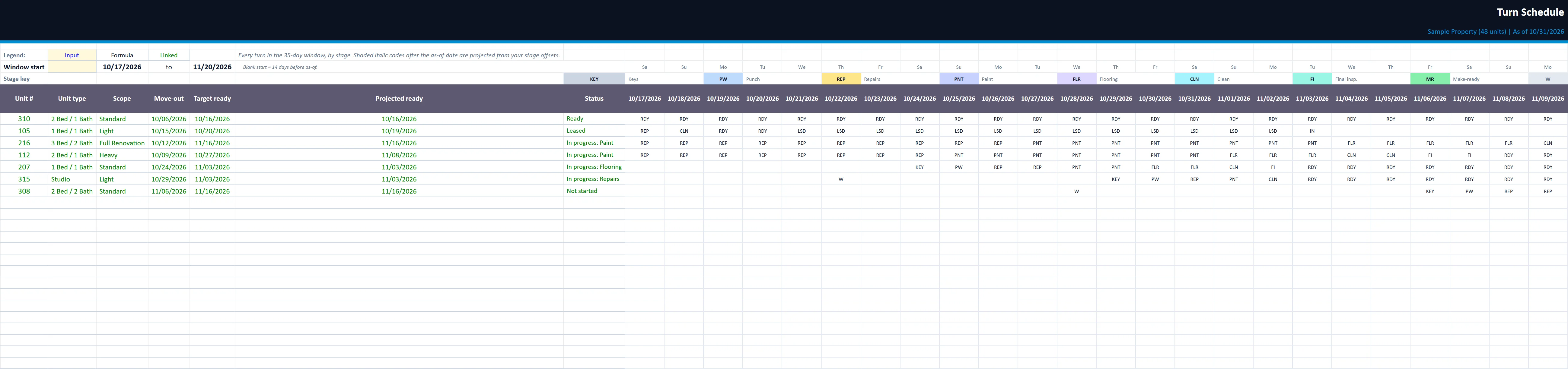
A 35-day board of every active turn by stage, with weekends shaded and the as-of date marked.
unit-turn-make-ready-tracker.xlsx
The Schedule tab of the unit-turn-make-ready-tracker workbook, filled in with the sample property
DashboardTurn BoardScheduleOwner SummaryVendorsCost AnalysisScope Standards

Owner Summary

A clean one-page turn report with your logo and company name, ready to send to owners.

Vendors

Your vendor list with trade, contact and rate notes, plus turns, speed vs standard and cost per turn from the board.

Cost Analysis

Averages and totals by scope, unit type, move-out month and vendor; budget vs actual by category; stage timing.

Scope Standards

Market rent by unit type, target days by scope, stage day offsets, flag rules and the turn budget matrix.

Built for

Who it is for

  • Maintenance supervisors running turns
  • Managers cutting vacant days
  • Owners holding vendors accountable

How to use it

Up and running in six steps

  1. 1Enter the property name and the as-of date on the Start Here tab. Everything is measured to the as-of date.
  2. 2On Scope Standards, set market rent by unit type, target days for each scope, the standard day offsets for each stage and the turn budget by scope and unit type.
  3. 3On Vendors, list your painters, flooring, cleaning and repair vendors (or in-house crews). They feed the vendor dropdowns on the Turn Board.
  4. 4On the Turn Board, add one row per move-out: unit, type, scope, move-out date, then the date each stage is finished, the lease and move-in dates, vendors and actual cost by category. The sample rows are inputs; overwrite or delete them.
  5. 5If a stage does not apply to a turn (no flooring on a Light turn), enter the same date as the stage before it. That keeps stage timing and vendor speed accurate.
  6. 6Review the Schedule each morning, the Dashboard weekly, and send the Owner Summary monthly. Enter your company name on the Start Here tab and drop your logo onto the Owner Summary (right-click the placeholder, Change Picture).

Rather have us run the numbers?

Send us your rent roll and T12 and we will build this for your property and show you what it says.

Questions

Unit Turn and Make-Ready Tracker questions

What is a make-ready?
The work to get a vacant unit ready for the next resident: inspection, repairs, paint, flooring, cleaning and a final walk.
How does it set ready dates?
From your scope standards. Each scope (light, standard, heavy or full renovation) has target days, and the workbook projects the ready date for units still in progress.
Does it track vacancy cost?
Yes. Days vacant and vacancy loss at market rent are calculated for every turn.

Insights

The guide behind it

All articles