
Skip to content
Next Level Property Management
> nlpm://searchLoading index…
  • Quick actions

    Talk to us/contact
  • Reno market data/market-data
  • Find an apartment/rentals
  • Resident portal/go/resident-portal
  • Client portal/go/client-portal
  • Call (775) 502-8287

Free template

Vendor bid leveling sheet

Compare up to five contractor bids line by line, price in whatever each bid left out so they cover the same scope, check Nevada license limits and score bidders on more than price.

  • Excel, Sheets, Numbers
  • Sample property included
  • 8 tabs

Get the template

Inside the workbook

What you get, tab by tab

Tab 1

Summary

KPI tiles, submitted vs leveled chart, insights, bidder comparison and the biggest line-item gaps.

vendor-bid-leveling-sheet.xlsx
The Summary tab of the vendor-bid-leveling-sheet workbook, filled in with the sample property
SummaryScope LevelingScoringOwner SummaryProjectBid LogQualifications

Tab 2

Scope Leveling

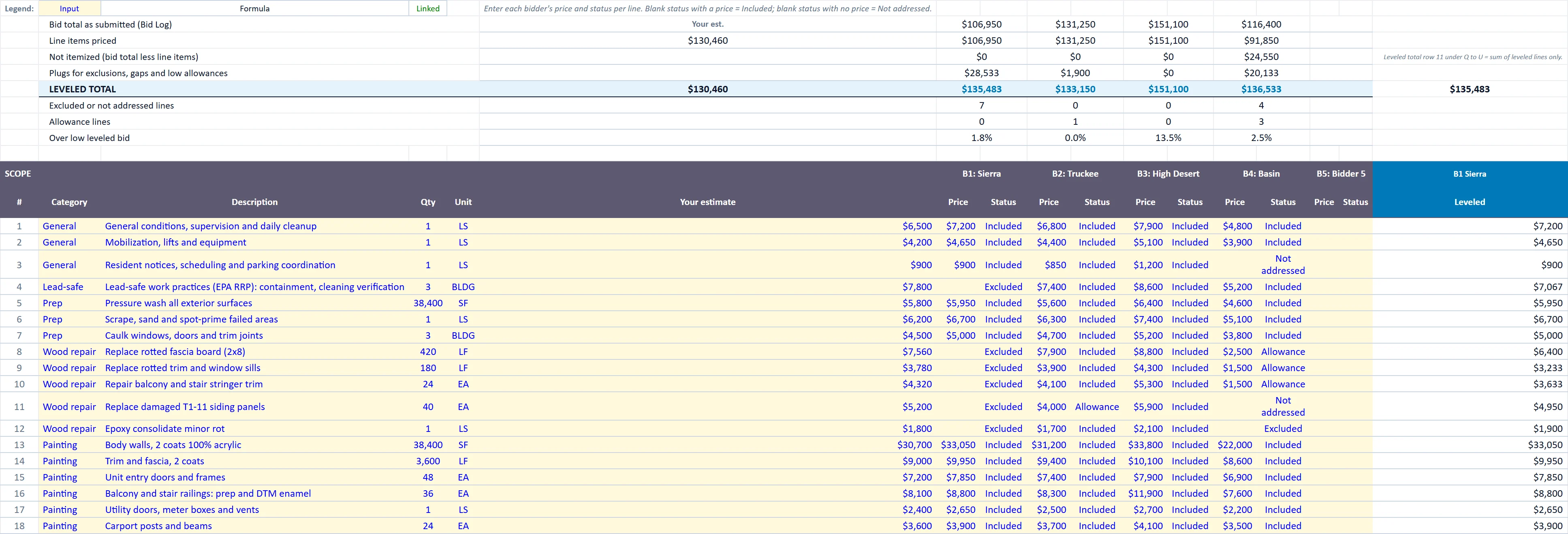
Line-by-line prices and status for each bidder, plugs, leveled totals and outlier flags.

vendor-bid-leveling-sheet.xlsx
The Scope Leveling tab of the vendor-bid-leveling-sheet workbook, filled in with the sample property
SummaryScope LevelingScoringOwner SummaryProjectBid LogQualifications

Tab 3

Scoring

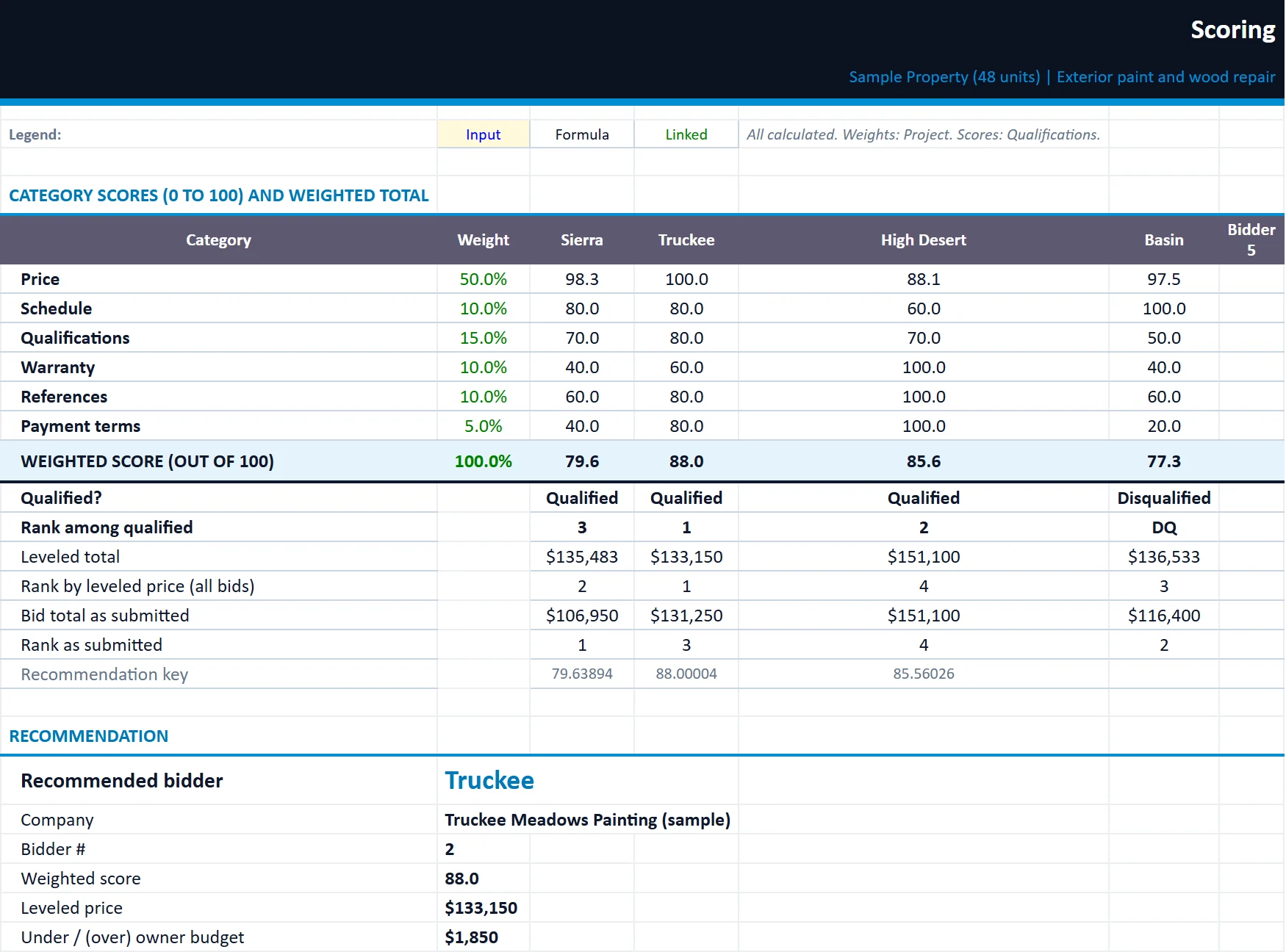
Weighted scores, rank and the recommended bidder among qualified bidders.

vendor-bid-leveling-sheet.xlsx
The Scoring tab of the vendor-bid-leveling-sheet workbook, filled in with the sample property
SummaryScope LevelingScoringOwner SummaryProjectBid LogQualifications

Owner Summary

White-label one-page bid recommendation memo for the owner.

Project

Project details, owner budget, required dates, leveling rules and scoring weights.

Bid Log

Each bidder's license, insurance, bonding, bid validity, bid total, duration, warranty and terms.

Qualifications

Scores from 1 to 5 plus pass/fail gates for license, license limit and insurance.

Built for

Who it is for

  • Owners awarding capital projects
  • Managers bidding large repairs
  • Investors running a renovation

How to use it

Up and running in six steps

  1. 1Enter the bid review date on the Start Here tab.
  2. 2On Project, describe the job, set the owner budget and required dates, choose the leveling rules and set scoring weights that total 100%.
  3. 3On Bid Log, enter each bidder: license number, monetary limit and verification, insurance, bonding, bid date, validity, bid total, duration, warranty and payment terms. Verify licenses on the Nevada State Contractors Board website.
  4. 4On Scope Leveling, list the scope lines with quantities and your estimate, then enter each bidder's price and status per line. For a lump-sum bid with no breakdown, mark covered lines Included with no price. The sample rows are inputs; overwrite or clear them.
  5. 5On Qualifications, score references, past performance, payment terms and responsiveness from 1 to 5. Schedule and warranty are suggested from the bids; override them if you disagree.
  6. 6Review Scoring and the Summary, then send the Owner Summary memo. Enter your company name on the Start Here tab and drop your logo onto the placeholder (right-click, Change Picture).

Rather have us run the numbers?

Send us your rent roll and T12 and we will build this for your property and show you what it says.

Questions

Vendor Bid Leveling Sheet questions

What is bid leveling?
Adjusting contractor bids so they cover the same scope. Items one bid excludes are priced in, so the lowest number is not just the one that left the most out.
How are missing items priced?
With the method you choose: the highest other bid, the average of other bids or your own estimate.
Does it check contractor licenses?
It records each bidder's Nevada license and monetary limit and flags a bid above that limit. Verify licenses on the Nevada State Contractors Board website.

Insights

The guide behind it

All articles